
Facilitator Manual
My Sessions
Manage every session you have booked — upcoming and past, with one-click join, cancel and complete.
My Sessions is where you manage every booking. Switch between upcoming and past, join a meeting, cancel, or mark a session as completed.
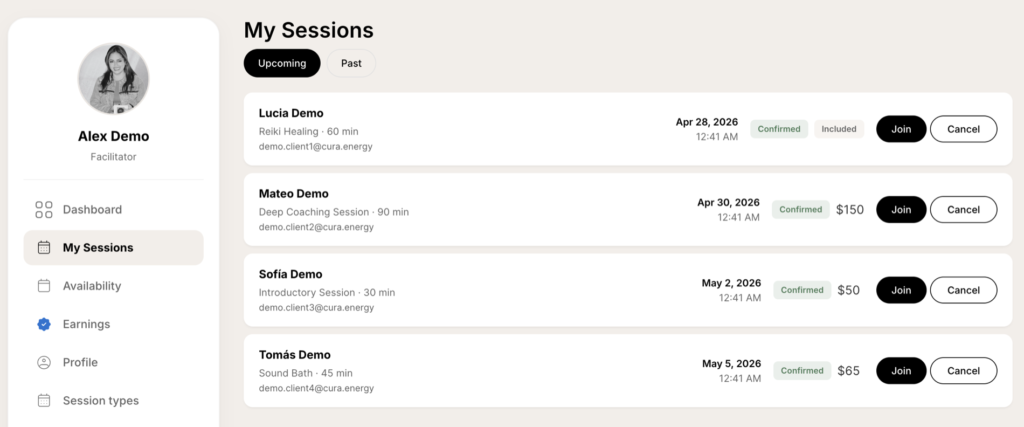
Upcoming vs Past
The two pills at the top filter the list:
- Upcoming — sessions scheduled now or in the future.
- Past — sessions whose end time has already passed.
What each row shows
- Client — name and email of the person who booked.
- Session — the session type and its duration.
- Date and time — shown in your timezone.
- Status badges:
- Confirmed — booking is live.
- Included — paid through the client’s CURA membership (no separate charge).
- Cancelled — booking was cancelled by you or the client.
- Completed — you marked the session as finished.
- Price — what the client paid for that session ($ amount or “Included”).
Actions
Join
Same rule as on the Dashboard — appears for confirmed sessions with a meeting URL, before the session ends.
Cancel
Cancels the booking and notifies the client by email. If your cancellation policy window has passed, your earnings for that session may be affected — see Earnings.
Mark as completed
After a session ends, mark it as completed so your commission can be released for payout. We do not auto-complete sessions on your behalf — this confirms the session actually took place.
Until you mark a past session complete, its earnings stay in Awaiting confirmation.