
Facilitator Manual
Earnings
Track every commission — what you have earned, what is awaiting confirmation, and what has been paid.
Earnings shows the money side of your CURA practice — top-line stats and a row-per-session transaction history.
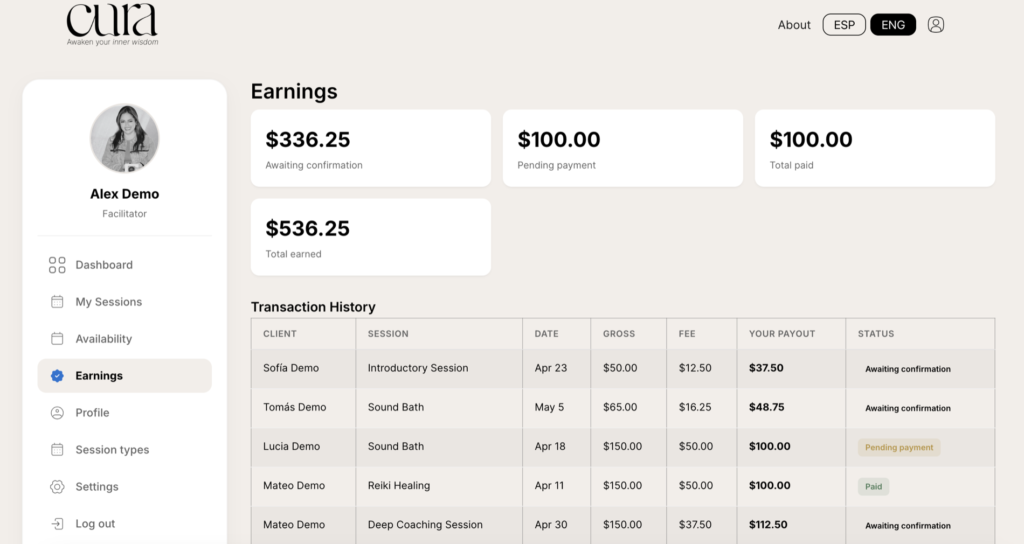
The four stats
- Awaiting confirmation — sessions whose date has passed but you have not yet marked as completed. The money is reserved but not yet payable.
- Pending payment — sessions you have marked completed; awaiting the next payout cycle.
- Total paid — sum of everything CURA has already paid you.
- Total earned — lifetime earnings across all three states above.
Transaction History
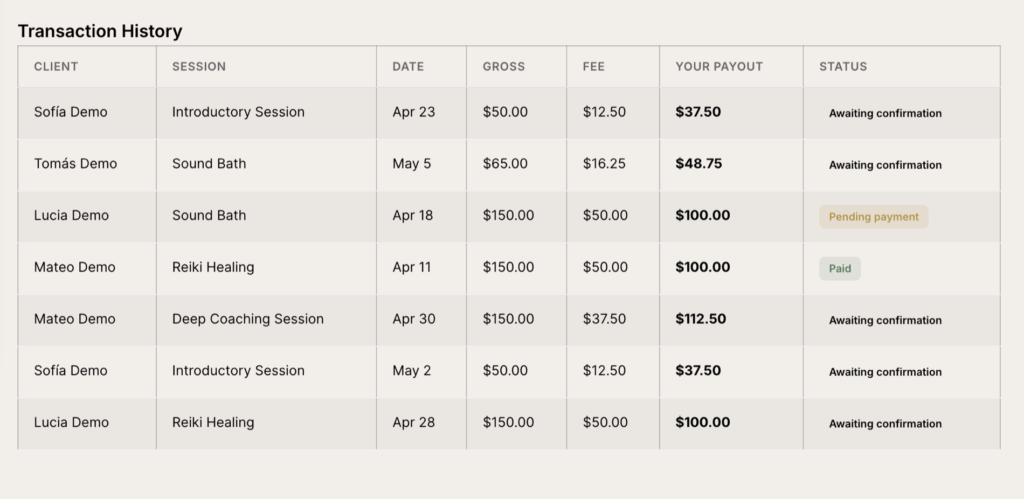
Columns
- Client — who booked.
- Session — session type.
- Date — when the session was held.
- Gross — total amount the client paid for that booking.
- Fee — CURA’s platform fee.
- Your payout — what you actually receive.
- Status — Awaiting confirmation, Pending payment, Paid or Cancelled.
How payouts are calculated
For every paid session:
- Gross = the price of the session type at the time of booking.
- Fee = a fixed percentage of gross (default 25%, configurable by CURA admin).
- Your payout = Gross − Fee.
Sessions booked through a client’s CURA membership use a fixed payout per included session, configured per plan. The Gross column will show the equivalent value the membership covers.
Releasing your earnings
A session moves from Awaiting confirmation to Pending payment only when you mark it as completed in My Sessions. This confirms the session actually took place — without this step, your earnings stay frozen.
Mark sessions completed within a day of finishing — it is the only thing standing between you and your payout.